See what Google Ads settings brought you here—and copy the whole thing.
✅ Real account ✅ Exact settings ✅ Step-by-step
This website is not affiliated with or endorsed by Google, YouTube, or any mentioned platform.
All trademarks belong to their respective owners.
🔻 Exact setup behind the ad you clicked
🔺 Compare your setup side-by-side.
Copy the whole setup.
Step-by-step.
After you buy, you’ll see what settings got you here.
You’ll see the whole setup behind the ad you clicked—from start to finish.
🔻 Exact settings you can copy
Custom Segments • Exclusions • Remarketing • Conversion Goals • Server-side Tracking • Tagging • Bidding • Budgeting • Frequency Capping • Rules • Scripts • Automations • Reporting • Scaling
◼︎ Why this matters
With the wrong setup, Google learns from the wrong signals.
The fix:
See how this setup:
One video ad powers every campaign.
• Cold traffic campaigns find only new visitors.
• Remarketing brings back those who didn’t convert.
• Exclusion lists stop campaigns from competing for the same person.
• Each campaign has one clear goal.
• Budget and bidding rules control where money goes.
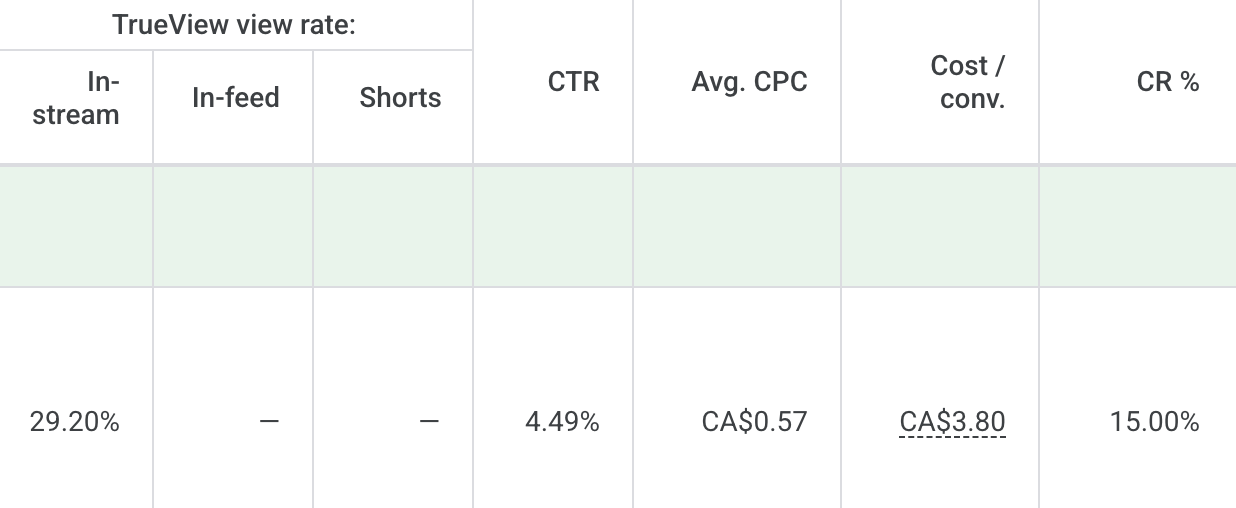
See how every campaign works together to train Google with the right signals—and how that can produce results like these.
Google Ads account screenshot
2026-07-21 at 10.30.14 AM
• View rate: 29.20%
• CTR: 4.49%
• Average CPC: CA$0.57
• Cost per conversion*: CA$3.80
• Conversion rate: 15.00%
*Conversion: 80% scroll + 3 minutes on this page
See how this setup:
Every part connects to the next.
• This video ad brought you to the landing page.
• GTM tracked what you did next.
• GA4 recorded the conversion data.
• Primary goals told Google what to optimize for.
• Server-side tracking captured more complete data.
See the full path from click to conversion—and compare it with yours.
Use the calls to:
You never have to stare at your account and wonder what to do next.
• See what the numbers are actually telling you.
• Pinpoint what needs your attention first.
• Avoid tweaking settings that should be left alone.
• Get answers before spending more.
With lifetime access, you can always come back for help as your ads scale.
The goal?
Send Google the right signals.
This setup show you how.
What if this doesn’t help me?
You’re covered for 30 days.
If you can’t see where your setup is leaking money or how to send Google the right signals, email me for a full refund.
Do I need to change everything in my account?
No.
Keep what works. Change only what improves your ads, funnel, and conversions.
Do I need to be technical?
No.
Follow the setup step-by-step and bring your questions to the weekly calls.
What if someone else manages my ads?
Use this as a second opinion.
See what’s happening inside your ad account and ask better questions about the work being done.
What if I have more questions?
Click to ask. ↘
Tap to ask. ↘
Google Ads Setup System is educational and implementation-based. Results vary based on your offer, market, budget, traffic, and execution.
No specific advertising results or financial returns are guaranteed.
This website is not affiliated with or endorsed by Google, YouTube, or any mentioned platform.
All trademarks belong to their respective owners.
You will be charged by:
SCALE ADS FAST INC.